
Galileo
Gain Complete Visibility Into Your Enterprise Data
Know what data you have, where it's stored, who can access it, and how to optimize it for security, efficiency, and compliance.
You Can't Secure What You Can't See
Unstructured (file-based) data makes up more than 80 percent of an organization's stored data. Galileo provides data insight on files stored on your network and in Microsoft 365 repositories, so you have the information you need to optimize and secure your stored files.
Leverage powerful reporting & analytics
With Galileo, You Get:

Directory and File Data Reports
Permissions Reports
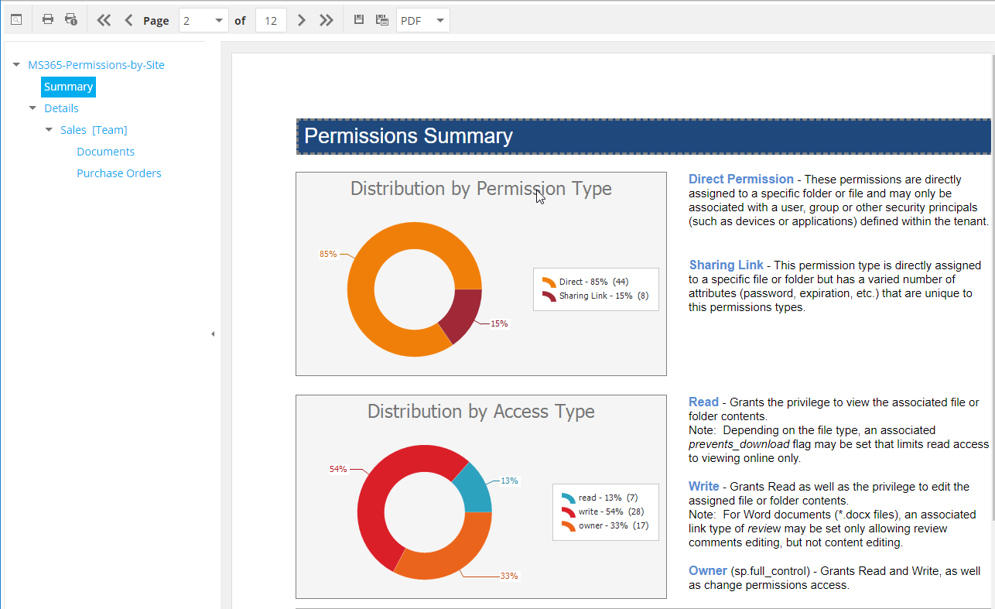
Identify the user permissions for network folders and Microsoft 365 repositories, which users have access permissions to a specific storage location, and all the storage locations that a specified user has access to and where that access is derived.

Analytics
An integrated set of data visualization applications designed to report, analyze, pinpoint, and highlight specific details on data stored on the enterprise network.
See what Galileo can do using these interactive demos!
Galileo On-Prem Data Analytics

Galileo M365 PowerBI Demo

Galileo On-Prem Permissions Reports

Identify Access Risks
Identify potential risks of users having access to files with sensitive information. Generate reports specifying NTFS access permissions, file system rights, and more. Utilize Galileo reports for data risk management, risk assessments, and security audits.
Understand Network Data Growth
Trending reports can indicate the rate at which content on network shares is growing, providing you an idea of when you’re approaching storage capacity. With this information along with information from other reports, you can clean up ROT (redundant, outdated, or trivial files), or plan for when you will need to purchase additional network storage.
Key Capabilities
See inside the files, not just around them.
Permissions tell you who could open a file. Content scanning tells you whether that matters. Galileo scans file contents against pattern definitions — account numbers, national identifiers, health record formats, credentials, and patterns you write yourself — and reports which files hold regulated or high-value content, and who currently holds rights to them.
That combination is what turns a report into a priority list. A folder open to Domain Users is a finding. A folder open to Domain Users holding four thousand files that match a national identifier pattern is the first thing you fix on Monday.
Utilize Flexible Reporting Options
With potentially petabytes of unstructured data stored across your enterprise network and Microsoft 365 repositories, it can become quite challenging identifying precise files or file permissions details. In addition to Galileo's built-in reports and graphical analytics tools, you can utilize Custom Query reports to pinpoint files meeting very specific criteria.
Built-in Reports
Built-in reports can be generated for Windows network file system directory data, permissions, file data, historic comparisons of access permissions, and data growth. Each of these classifications include one or more report types.
Runs entirely inside your environment.
Galileo installs on your servers and writes to your database. Scan results, permissions data, content-scan findings, and the metadata describing all of it remain on infrastructure you own and administer. There is no vendor-side tenant, no metadata forwarded outward for processing, and no dependency on a hosted service for the product to function.
For organizations operating under residency, sovereignty, or agency hosting requirements, this removes a class of review that hosted alternatives cannot avoid.
When the built-in reports don’t ask your question.
Galileo’s built-in reports cover the questions most organizations ask most often. For everything else, there is Custom Query, which reaches the underlying database directly and returns exactly the files that match the criteria you define — the capability one school district used to find every file a cryptovirus had renamed across the enterprise after restoring from backup.
Galileo Powers These Solutions
Data Insight
See what you have, who can access it, and who owns it.
Data Access Governance
Find the exposure that permissions reviews miss.
Data Management
Decide what to move, archive, or delete before you act.
Customer Success Stories
Organizations across the globe trust Condrey to protect their most critical data from exposure and attacks.
“We Secured All of Our Sensitive Files Quickly.”
A U.S. based insurance company’s challenges of keeping sensitive account information located in unstructured data away from unauthorized users has been solved, thanks to a combined deployment of Galileo and Senergy for a Data Access Governance solution. Before deploying the two products, the insurance company did not have the confidence…
A State Agency Relies on Galileo for Needed Data and Permissions Information
A state land office in the United States needed both file system data and file system permissions included in the same report. This report was needed to demonstrate compliance to state requirements for access restricted to only authorized users. Because they are easily generated as built-in reports in Galileo, File…
Software Developer Saves Thousands of Dollars by Identifying Irrelevant Files
A software developer was in the process of consolidating servers and needed to identify those files that were relevant and needed to be migrated to one of the new servers, and those files that were less relevant and could be archived or deleted. They decided to base the migration decision…
Ransomware File Recovery: K-12 Case Study
A school district in the United States found that its servers were infected with a cryptovirus. The virus encrypted and inserted the word “decrypt” into the filenames of all affected files. The party responsible for the cryptovirus demanded that the school district pay a ransom in order to get the…