
Aurora
How do you provide secure remote access to Windows file shares—without VPNs?
Aurora delivers secure, web-based access to Windows folders using a familiar, Windows-like interface. Users can access files remotely through a browser while IT maintains full control through Microsoft Active Directory.
Access Network Data, From Anywhere.
Through a secure web connection and your Active Directory identity, access files to which you have access rights located on your organization’s network. Securely share files with users outside your organization through an authenticated web-based guest access portal.
Provide flexiblity and convenience.
With Aurora, You Can Gain:

Intuitive Interface
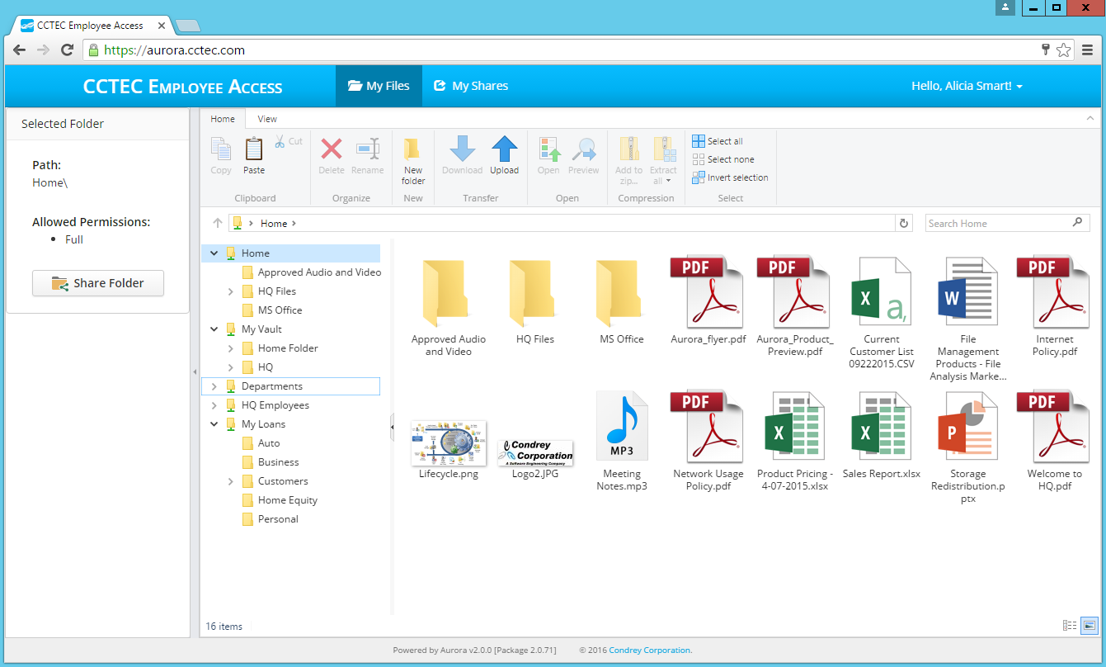
The interface is built to look and act like Windows so it's intuitive with little or no training required. Once authenticated, all NTFS file shares are automatically mounted where stored files can be accessed, modified, created, etc.
External File Sharing
Aurora lets you securely share Windows Server stored files with users outside of your network – including files larger than those allowed to be shared via email – through an authenticated web-based guest access portal.

Admin Control
Using Aurora’s intuitive web management interface, system administrators can set up two-factor authentication, create interface background branding, and establish which NTFS file shares are accessible to individual users.
Aurora 2.5 - Now with Multi-Factor Authentication
See it in Action!
Remote, Web-based Access to Windows Folders
Through Microsoft Active Directory authentication via a web browser, Aurora provides user-defined access to approved user and group storage areas. Furthermore, Aurora does so without the need for login scripts. Aurora provides the ability to remotely create folders, upload/download multiple folders and files at once, rename, delete, copy and paste files and folders, along with the ability to locate files through search and filter options.
Key Capabilities
Secure, Identity-based Remote User Access
Aurora users can log in from their workstation, laptop, or mobile device over a secure web connection through any supported browser. Secure authentication is assured through Microsoft Active Directory credentials and, if enabled by the administrator, two-factor authentication via time-based one-time passwords (TOTP). Aurora matches the user’s unique identity to the storage areas which they are authorized to access and then displays the user’s home folder and any authorized group share folders in an intuitive Windows Explorer-like interface.
External User File Sharing
Enhance inter-organizational collaboration by providing the ability to securely share files with users outside your organization through your company branded, web-based guest access portal. Avoid the limitations, constraints, and risks of email or public cloud sharing platforms by accessing and sharing files directly from your Windows NTFS network file system storage through the Aurora interface.